
Solving for timekeeping
It's time to put an end to the tedious task of time tracking. No more calendar archeology, no more flipping through emails or manually adjusting tasks or typing descriptions nobody will read. If Agentic AI gives us anything, it is a willing hand to do the tedious drudgery, and do it well.
Enter the Agentic timekeeper, quietly housekeeping while we focus on our work.
The crucial tick
In AbleTime, logged hours are the machinery that moves the entire project forward, each entry updating the Kanban, timeline, dashboard and reports. This demands an efficient UI with minimal friction. Productivity widgets and no-context-switch workflows are there to make things as fast and painless as possible.
With AI, we gained the opportunity to create an even better way: a silent, privacy-oriented, accurate timekeeper. If you work with AI at all in your workaday life, the benefits of this are immediate. No more manual time entries for you. No more Slack back-scrolling to figure out what you did yesterday, much less this morning.
The Agent simply responds to what you type; if it is workflow-related, it creates a private, your-eyes-only draft that is yours and yours alone to accept or dismiss. Description typed, time kept, and not a moment's distraction in your day.
The Agentic way
The first thing on the table was privacy. I loathe time trackers and project managers that use employee monitoring and other, sneakier means to keep tabs on users. Our solution was to physically isolate the records the Agents write in the database.
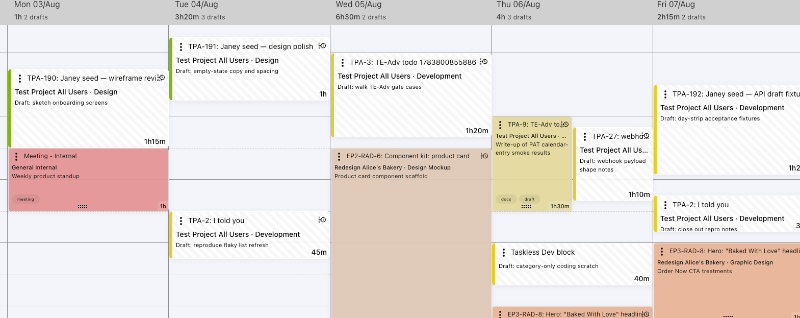
The new table has zero connective tissue to billing, reports, even regular time entries, and the only way a draft can become a time entry is if you explicitly make it so. You can ask your Agent to approve them, and create time entries directly, but even this requires a specific "opt-in" toggle to be flipped in your profile settings.
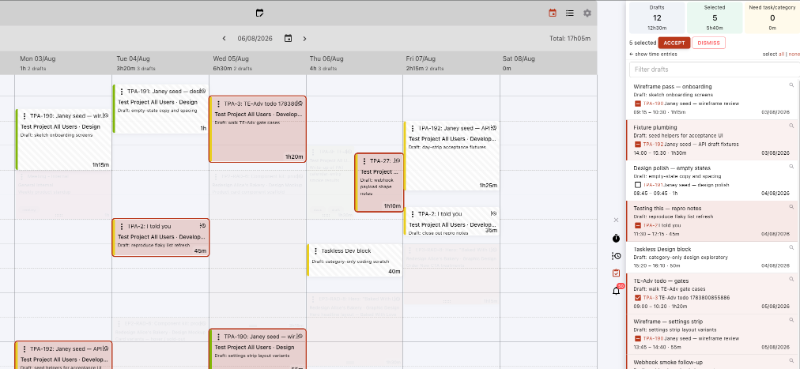
To keep the "accept" flow fast and painless, we also added a dedicated panel where drafts can be accepted or dismissed in bulk.
AbleTime speaks Model Context Protocol, or MCP. This is the protocol through which AI can interact with 3rd-party APIs, in this case AbleTime. Our new REST/Webhook interface was built to accommodate integrations like Slack or Xero, but for me the real win was building in the MCP channel.
The channel authenticates via OAuth with chat interfaces, or by configuring desktop interfaces like OpenAI Codex or Cursor with the user's Personal Access Token.
Personal by nature
AbleTime has different permission tokens for different jobs. API tokens, for instance, use broad grants like "task.read" to determine what they are allowed to access. These are org-wide and user-anonymous, so not very useful to individual users. This is why the MCP channel works through a Personal Access Token, or PAT. Unlike the API key, the PAT is used for personal integrations like your Agent connection.
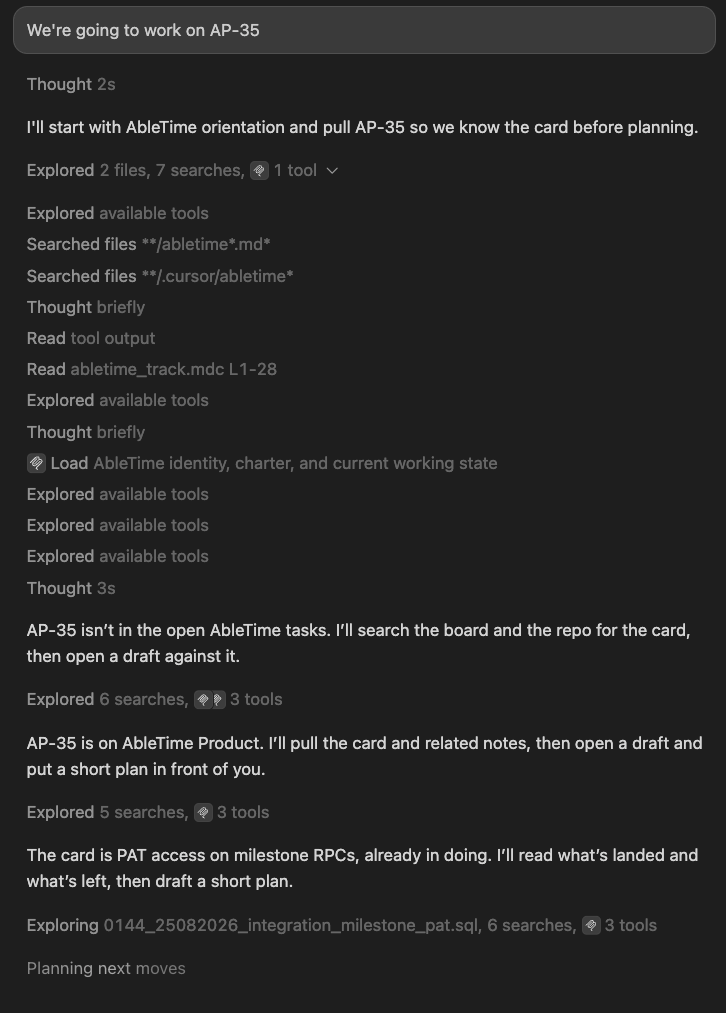
The first time the Agent connects, it orients itself and reads in your current workflow. What tasks you are working on, which projects and a few other essentials. From there, it can track your time according to your conversation or instructions.
In the Cursor chat screenshot, I opened the conversation by naming a specific task. This isn't required; the Agent can decide independently whether or not what you are discussing is workflow or random inquiry. You can customize this behavior through simple prompts that the Agent will remember. These instructions can take multiple forms like "ignore any references to meetings" or "keep the time entry descriptions brief and specific" or "update my time every four prompts." These prompts extend the base configuration, and help fine-tune your experience.
The Agent is of course more than happy to take direct instruction. "I was AFK, assume I'm back now" or "update the current entry to now, and let's look at..." are handy entry-grooming prompts that help your Agent keep aligned to your workday. Left on its own, any absence longer than 30 minutes is treated as an "away." This can also be configured through prompts to match your personal workflow.
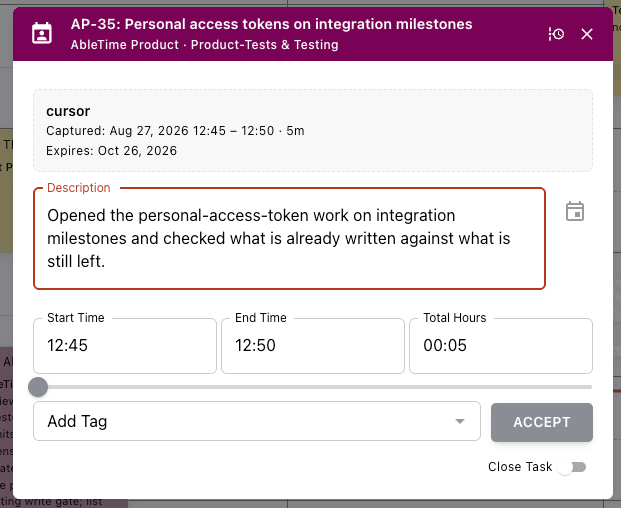
By default, AbleTime instructs the Agent to create a 5-minute "placeholder" time entry that it will update continuously as you work. Every time it updates, the description will change, either rewritten or appended to depending upon your preference, until the session completes. The example time entry was created by the Agent session above.
Tasks, comments and assignments
You might have gathered from context that there's a little more on offer than simple time tracking. Via AbleTime MCP, your Agent will also create specific work-related tasks if the work is new, or (again, depending upon your workflow and personal preferences) only pick from existing tasks. You can add comments, send @mention notifications, change assignments or perform a multitude of other tasks as well. I'll discuss this more in my next blog, but it's important context here because the entire purpose of AbleTime's Agentic Timekeeper is that it eliminates a tiresome, flow-breaking task that constantly interrupts your day.
Because of your PAT, you can have your Agent perform any task allowed by your role in the organization.
We've been using Agentic time-tracking for months in testing, and it's become a reliable partner and reference. No more manual time tracking ... and I for one couldn't be more relieved.
— Grant Shepert is the founder of AbleTime; life currently finds him coding, writing, and occasionally renovating in the north of France.